---
title: Household Breaker Limit
description: Steps and instructions to configure household breaker limit settings on the Atmozen app
---
[Skip to content](https://support.atmoce-au.com/knowledge-base/household-breaker-limit#main-content)
English - United Kingdom
Show submenu for translations
[](https://www.atmoce.com/au)
- [Home](https://support.atmoce-au.com/knowledge-base)
- [Atmoce Website](https://www.atmoce.com/au)
Open main navigation
Close main navigation
- [Home](https://support.atmoce-au.com/knowledge-base)
- [Atmoce Website](https://www.atmoce.com/au)
- English - United Kingdom
Show submenu for translations
- [Customer Portal](https://support.atmoce-au.com/tickets-view)
[Customer Portal](https://support.atmoce-au.com/tickets-view?hsLang=en-gb)
How can we help you?
- There are no suggestions because the search field is empty.
1. [Atmoce Knowledge Base](https://support.atmoce-au.com/knowledge-base?hsLang=en-gb)
2. [Site Configuration](https://support.atmoce-au.com/knowledge-base/site-configuration?hsLang=en-gb)
17 September 2026
# Household Breaker Limit
## Steps to configure household breaker limit settings on the Atmozen app
The **Household Breaker Limit** function limits the current flowing through the household main switch to help prevent the main breaker from tripping due to overcurrent.
When the measured grid current approaches the configured limit, the system automatically adjusts battery charging or discharging power to keep the current within the specified value.
For example, this function may be helpful when high house loads operate at the same time the battery is configured to charge from the grid.
### Instructions
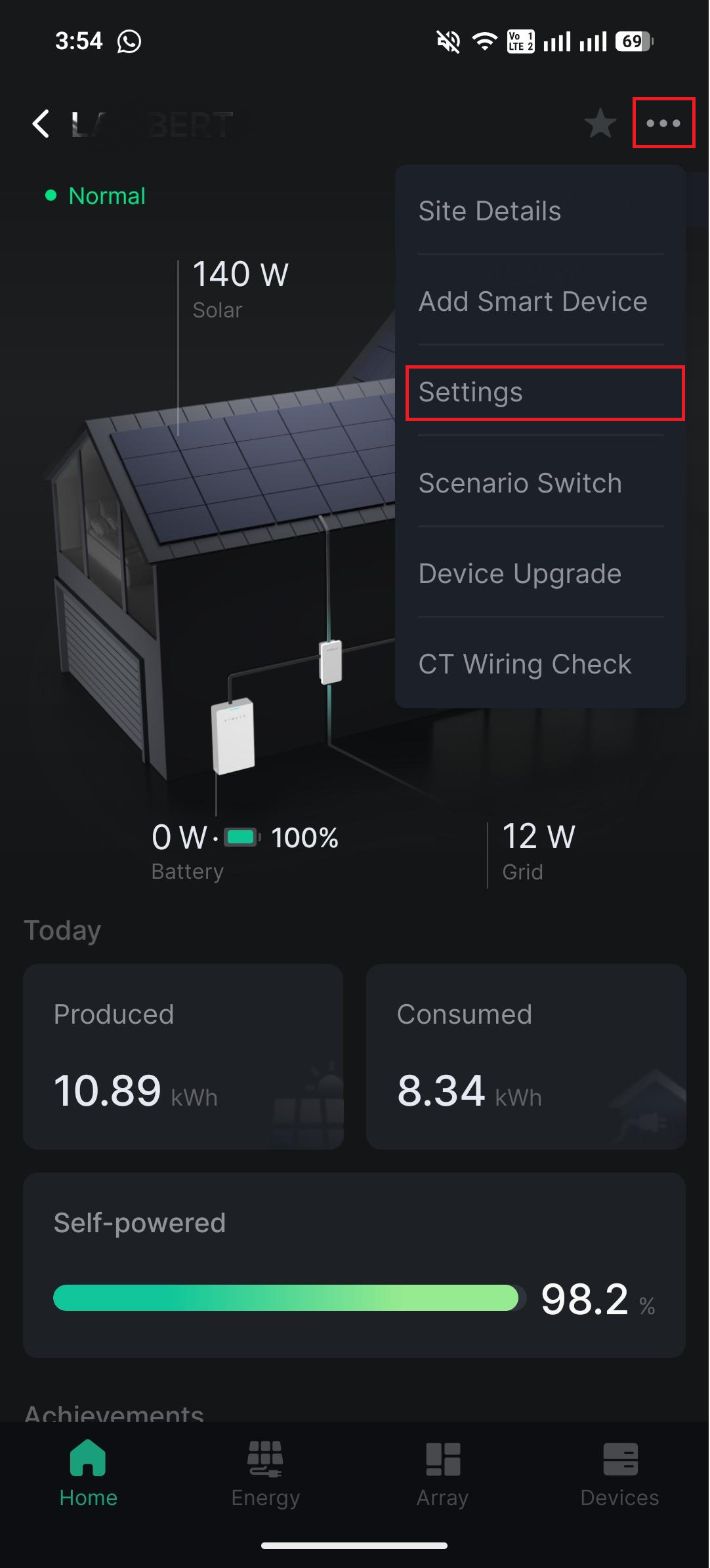
1. Click on the **...** at the top right of the app.
2. Click **Settings**.
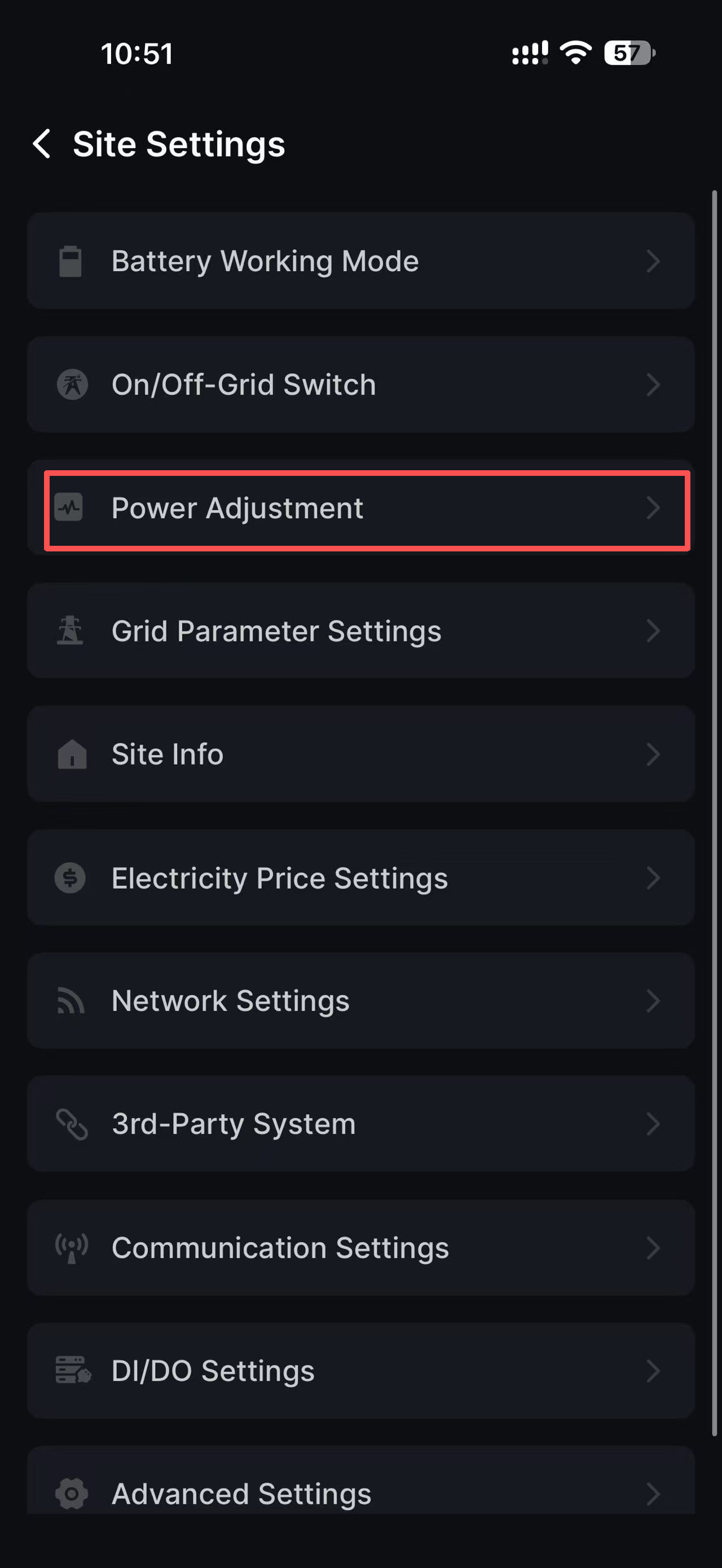
3. Click **Power Adjustment**.
4. Expand **Household Breaker Limit**, configure the **Main Switch Rated Current**, and click **OK**.

---
*Information in this article was current at the time of publication or last update. Product specifications, software, firmware and procedures may change. Please refer to the latest ATMOCE documentation before proceeding.*
- [Installation](https://support.atmoce-au.com/knowledge-base/installation?hsLang=en-gb#main-content)
- [Battery](https://support.atmoce-au.com/knowledge-base/installation?hsLang=en-gb#battery)
- [Gateway](https://support.atmoce-au.com/knowledge-base/installation?hsLang=en-gb#gateway)
- [Other devices](https://support.atmoce-au.com/knowledge-base/installation?hsLang=en-gb#other-devices)
- [Combiner Box](https://support.atmoce-au.com/knowledge-base/installation?hsLang=en-gb#combiner-box)
- [Commissioning](https://support.atmoce-au.com/knowledge-base/commissioning?hsLang=en-gb#main-content)
- [Atmozen Commissioning](https://support.atmoce-au.com/knowledge-base/commissioning?hsLang=en-gb#atmozen-commissioning)
- [Adding Smart Device](https://support.atmoce-au.com/knowledge-base/commissioning?hsLang=en-gb#adding-smart-device)
- [Site Configuration](https://support.atmoce-au.com/knowledge-base/site-configuration?hsLang=en-gb)
- [Troubleshooting](https://support.atmoce-au.com/knowledge-base/troubleshooting?hsLang=en-gb#main-content)
- [Battery](https://support.atmoce-au.com/knowledge-base/troubleshooting?hsLang=en-gb#battery)
- [Backup](https://support.atmoce-au.com/knowledge-base/troubleshooting?hsLang=en-gb#backup)
- [Service & Warranty](https://support.atmoce-au.com/knowledge-base/service-warranty?hsLang=en-gb#main-content)
- [Device Replacement](https://support.atmoce-au.com/knowledge-base/service-warranty?hsLang=en-gb#device-replacement)
- [FAQs](https://support.atmoce-au.com/knowledge-base/faqs?hsLang=en-gb#main-content)
- [Customer FAQs](https://support.atmoce-au.com/knowledge-base/faqs?hsLang=en-gb#customer-faqs)
- [Installer FAQs](https://support.atmoce-au.com/knowledge-base/faqs?hsLang=en-gb#installer-faqs)
[](https://www.atmoce.com/au)
[mailto:email@email.com](mailto:email@email.com)
Copyright © 2026, ATMOCE Australia Pty Ltd