---
title: MS-7K-U - M-ELV Battery
description: Requirements and instructions to install a MS-7K-U M-ELV Battery
---
[Skip to content](https://support.atmoce-au.com/knowledge-base/m-elv-battery#main-content)
English - United Kingdom
Show submenu for translations
[](https://www.atmoce.com/au)
- [Home](https://support.atmoce-au.com/knowledge-base)
- [Atmoce Website](https://www.atmoce.com/au)
Open main navigation
Close main navigation
- [Home](https://support.atmoce-au.com/knowledge-base)
- [Atmoce Website](https://www.atmoce.com/au)
- English - United Kingdom
Show submenu for translations
- [Customer Portal](https://support.atmoce-au.com/tickets-view)
[Customer Portal](https://support.atmoce-au.com/tickets-view?hsLang=en-gb)
How can we help you?
- There are no suggestions because the search field is empty.
1. [Atmoce Knowledge Base](https://support.atmoce-au.com/knowledge-base?hsLang=en-gb)
2. [Installation](https://support.atmoce-au.com/knowledge-base/installation?hsLang=en-gb)
3. [Battery](https://support.atmoce-au.com/knowledge-base/installation?hsLang=en-gb#battery)
22 September 2026
# MS-7K-U - M-ELV Battery
## Instructions to install a MS-7K-U M-ELV Battery
### Contents
#### [Minimum Installation Clearances](https://support.atmoce-au.com/knowledge-base/m-elv-battery#clearance)
#### [Mounting](https://support.atmoce-au.com/knowledge-base/m-elv-battery#mounting)
#### [AC Connection](https://support.atmoce-au.com/knowledge-base/m-elv-battery#ac)
#### [CAN Connection](https://support.atmoce-au.com/knowledge-base/m-elv-battery#can)
---
### Minimum Installation Clearances

1. Ensure the space allows for the M-ELV battery dimensions as shown in the figure above.
2. Ensure there is at least **150 mm** of clearance above the battery.
While there are no left and right minimum clearances, please be aware that the side handlebars are **20 cm** in length.
---
### Mounting
3 mounting options are available:
For floor mount options, if the floor is uneven, levelling feet can be purchased to ensure the battery is:
1. Parallel to the wall, and
2. Perpendicular to the floor.
#### Wall mounting
1. Drill holes at the wall mounting positions indicated on the marking plate.

2. Knock the expansion bolts into the holes with a hammer, tighten to 9–14 Nm, then loosen the screws.
3. Install the mounting plate, aligning with the holes. Insert and tighten the screws to 9-14 Nm.

4. Insert the 4 mounting columns on the back of the battery into the slide rail and slide the battery to the end.

#### Floor mounting
1. Drill holes at the floor mounting positions indicated on the marking plate.

2. Knock the expansion bolts into the holes with a hammer, tighten to 9–14 Nm, then loosen the screws.
3. Place the battery close to the wall, ensuring it is parallel to the wall and perpendicular to the floor.
4. Place the mounting lugs in position.
5. Insert the M6 screws and tighten them to 3 Nm.

6. Insert the M10 expansion screws and tighten to 9-14 Nm.
If the skirting board is too thick, add suitable spacers behind the floor mounting brackets to ensure proper alignment and secure installation.
#### Floor parallel mounting
For floor parallel mounting, Inter-Module Bracket Kits must be purchased. When used, the distance between the front and back batteries should be approximately 20 mm.

1. Follow the above floor mounting instructions until step 5.
2. Align the mounting lug above, stacking **Hole A** with the **previous mounting lug** together.
3. Insert the M8 expansion screws and tighten to 9-14 Nm.

4. Place the second battery in front of the one next to the wall, maintaining a space of 20 mm between adjacent batteries.
5. Align **Hole C** with the **battery side holes**, insert the M6 screws, and tighten to 3 Nm.

More batteries can be added accordingly.
---
### AC Connection
#### AC cable sizing

#### AC Wiring
MS-7K-U M-ELV Battery is a one-SKU product, compatible with both 1 phase and 3 phase systems.
1. Remove the knockout on the battery side.
1. In case of multiple batteries, remove the knockout on both sides.
2. Connect the **AC cable** to the **AC terminal** in the battery.

For 1 phase installations, the **plug-in bridge** must be installed at each battery terminal to bridge L1, L2 and L3.
1. Do not use external cables or improvised jumpers.
2. Once installed, it should sit flush.
3. If easily removed, stop installation and contact Atmoce Service.

---
### CAN Connection
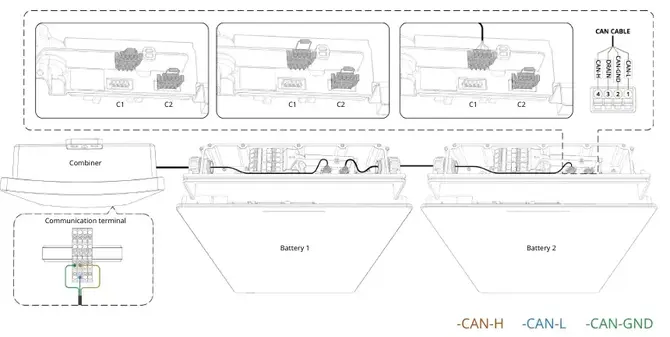
It is recommended to use:
- The **1.5 m** CAN communication cable between the batteries, and
- This cable is a 4-core cable, including the DRAIN signal wire.
- The DRAIN signal is required for connections between batteries.
- The **3 m** CAN communication cable between the battery and the Combiner Box / Gateway.
- This cable is a 3-core cable and does not include the DRAIN signal wire.
The 'last' battery (furthest from the Combiner Box / Gateway) requires **termination** on the C2 terminal.
- Battery cables can also be routed from the right-hand side. In this case, the resistor at the C1 CAN terminal of the battery shall serve as the end-of-line termination resistor.
The below shows a 1 battery scenario:

The below shows a multiple battery scenario:
2-3x 120 Ohm resistors (in parallel) may be required on the C2 terminal if:
1. \>= 6 batteries are installed per M-Gateway,
2. Not all the batteries are detected, or
3. The backup unit is not detected (if applicable).
---
*Information in this article was current at the time of publication or last update. Product specifications, software, firmware and procedures may change. Please refer to the latest ATMOCE documentation before proceeding.*
- [Installation](https://support.atmoce-au.com/knowledge-base/installation?hsLang=en-gb#main-content)
- [Battery](https://support.atmoce-au.com/knowledge-base/installation?hsLang=en-gb#battery)
- [Gateway](https://support.atmoce-au.com/knowledge-base/installation?hsLang=en-gb#gateway)
- [Other devices](https://support.atmoce-au.com/knowledge-base/installation?hsLang=en-gb#other-devices)
- [Combiner Box](https://support.atmoce-au.com/knowledge-base/installation?hsLang=en-gb#combiner-box)
- [Commissioning](https://support.atmoce-au.com/knowledge-base/commissioning?hsLang=en-gb#main-content)
- [Atmozen Commissioning](https://support.atmoce-au.com/knowledge-base/commissioning?hsLang=en-gb#atmozen-commissioning)
- [Adding Smart Device](https://support.atmoce-au.com/knowledge-base/commissioning?hsLang=en-gb#adding-smart-device)
- [Site Configuration](https://support.atmoce-au.com/knowledge-base/site-configuration?hsLang=en-gb)
- [Troubleshooting](https://support.atmoce-au.com/knowledge-base/troubleshooting?hsLang=en-gb#main-content)
- [Battery](https://support.atmoce-au.com/knowledge-base/troubleshooting?hsLang=en-gb#battery)
- [Backup](https://support.atmoce-au.com/knowledge-base/troubleshooting?hsLang=en-gb#backup)
- [Service & Warranty](https://support.atmoce-au.com/knowledge-base/service-warranty?hsLang=en-gb#main-content)
- [Device Replacement](https://support.atmoce-au.com/knowledge-base/service-warranty?hsLang=en-gb#device-replacement)
- [FAQs](https://support.atmoce-au.com/knowledge-base/faqs?hsLang=en-gb#main-content)
- [Customer FAQs](https://support.atmoce-au.com/knowledge-base/faqs?hsLang=en-gb#customer-faqs)
- [Installer FAQs](https://support.atmoce-au.com/knowledge-base/faqs?hsLang=en-gb#installer-faqs)
[](https://www.atmoce.com/au)
[mailto:email@email.com](mailto:email@email.com)
Copyright © 2026, ATMOCE Australia Pty Ltd