---
title: Software Updates
description: Steps and instructions to update the ATMOCE system software using the Atmozen app
---
[Skip to content](https://support.atmoce-au.com/knowledge-base/software-updates#main-content)
English - United Kingdom
Show submenu for translations
[](https://www.atmoce.com/au)
- [Home](https://support.atmoce-au.com/knowledge-base)
- [Atmoce Website](https://www.atmoce.com/au)
Open main navigation
Close main navigation
- [Home](https://support.atmoce-au.com/knowledge-base)
- [Atmoce Website](https://www.atmoce.com/au)
- English - United Kingdom
Show submenu for translations
- [Customer Portal](https://support.atmoce-au.com/tickets-view)
[Customer Portal](https://support.atmoce-au.com/tickets-view?hsLang=en-gb)
How can we help you?
- There are no suggestions because the search field is empty.
1. [Atmoce Knowledge Base](https://support.atmoce-au.com/knowledge-base?hsLang=en-gb)
2. [Site Configuration](https://support.atmoce-au.com/knowledge-base/site-configuration?hsLang=en-gb)
23 September 2026
# Software Updates
## Steps to update the ATMOCE system software using the Atmozen app
Two methods are available to update the ATMOCE system software. The update can be achieved from the [Home page](https://support.atmoce-au.com/knowledge-base/software-updates#home) or directly on the [Devices page](https://support.atmoce-au.com/knowledge-base/software-updates#devices).
Software upgrades generally take 5-15 minutes to perform the download and installation of the upgrade. You will be able to view the progress of the upgrade once started.
Installer accounts can only upgrade the Gateway to the **latest available version**. Firmware rollback is not available to installers.
For special firmware requirements or rollback requests, contact the **ATMOCE Service**.
### Instructions
#### Home page
1. Click on the **...** at the top right of the app.
2. Select **Device Upgrade.**

3. Compare the versions under **New Version** and **Current Version**.
1. If the **right arrow** is available, different versions can be selected.
2. A detailed description of the update can be found by clicking **Version description?**.

4. Click **Upgrade** to start the update.

#### Devices page
1. Click on the **Devices** tab.
2. Click on the **Gateway** tab and select the **Gateway**.
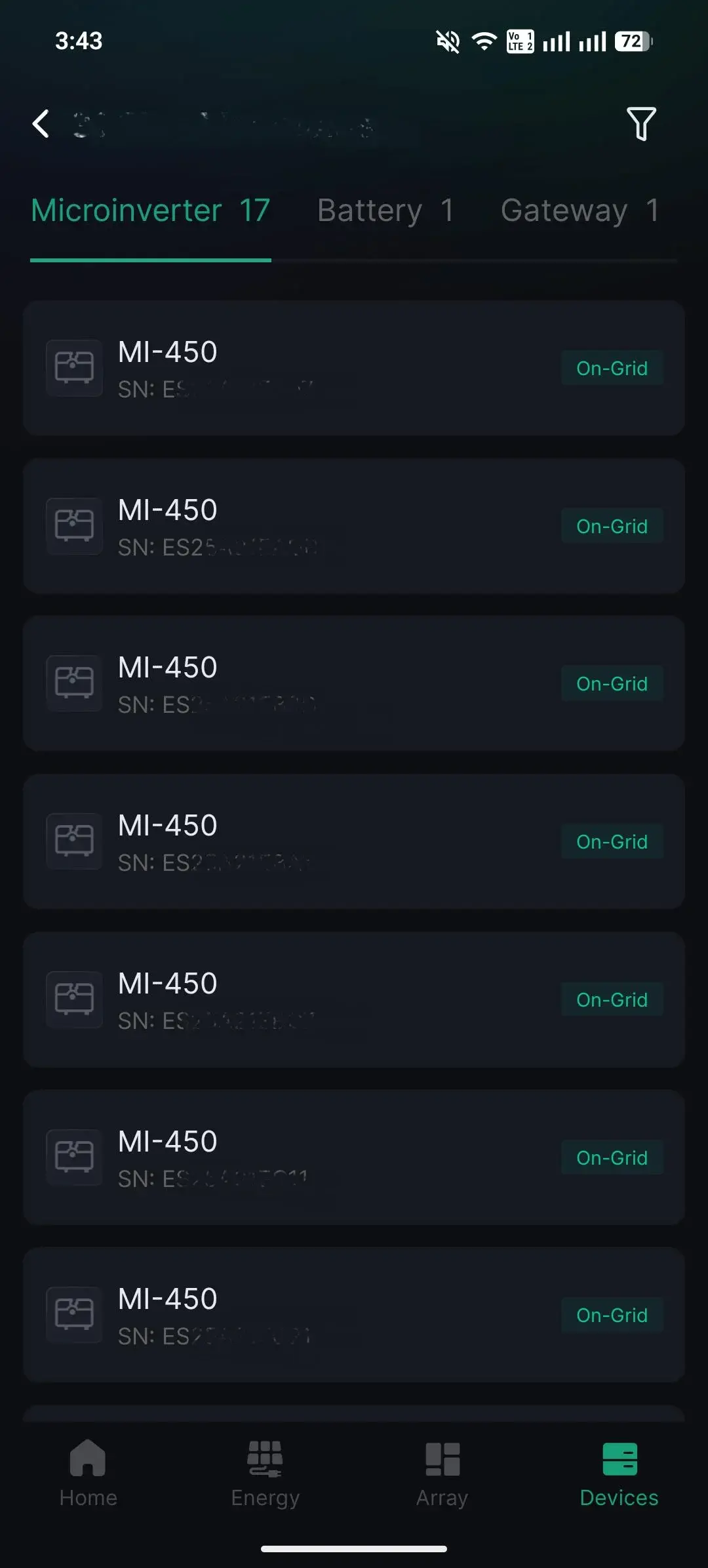
3. Click on the **...** at the top right of the app.
4. Select **Device Upgrade.
**
5. Follow the same steps from the Home page under[**Step 3**](https://support.atmoce-au.com/knowledge-base/software-updates#step3).
---
*Information in this article was current at the time of publication or last update. Product specifications, software, firmware and procedures may change. Please refer to the latest ATMOCE documentation before proceeding.*
- [Installation](https://support.atmoce-au.com/knowledge-base/installation?hsLang=en-gb#main-content)
- [Battery](https://support.atmoce-au.com/knowledge-base/installation?hsLang=en-gb#battery)
- [Gateway](https://support.atmoce-au.com/knowledge-base/installation?hsLang=en-gb#gateway)
- [Other devices](https://support.atmoce-au.com/knowledge-base/installation?hsLang=en-gb#other-devices)
- [Combiner Box](https://support.atmoce-au.com/knowledge-base/installation?hsLang=en-gb#combiner-box)
- [Commissioning](https://support.atmoce-au.com/knowledge-base/commissioning?hsLang=en-gb#main-content)
- [Atmozen Commissioning](https://support.atmoce-au.com/knowledge-base/commissioning?hsLang=en-gb#atmozen-commissioning)
- [Adding Smart Device](https://support.atmoce-au.com/knowledge-base/commissioning?hsLang=en-gb#adding-smart-device)
- [Site Configuration](https://support.atmoce-au.com/knowledge-base/site-configuration?hsLang=en-gb)
- [Troubleshooting](https://support.atmoce-au.com/knowledge-base/troubleshooting?hsLang=en-gb#main-content)
- [Battery](https://support.atmoce-au.com/knowledge-base/troubleshooting?hsLang=en-gb#battery)
- [Backup](https://support.atmoce-au.com/knowledge-base/troubleshooting?hsLang=en-gb#backup)
- [Service & Warranty](https://support.atmoce-au.com/knowledge-base/service-warranty?hsLang=en-gb#main-content)
- [Device Replacement](https://support.atmoce-au.com/knowledge-base/service-warranty?hsLang=en-gb#device-replacement)
- [FAQs](https://support.atmoce-au.com/knowledge-base/faqs?hsLang=en-gb#main-content)
- [Customer FAQs](https://support.atmoce-au.com/knowledge-base/faqs?hsLang=en-gb#customer-faqs)
- [Installer FAQs](https://support.atmoce-au.com/knowledge-base/faqs?hsLang=en-gb#installer-faqs)
[](https://www.atmoce.com/au)
[mailto:email@email.com](mailto:email@email.com)
Copyright © 2026, ATMOCE Australia Pty Ltd