
Contents
Power Supply
Grid CT
PV CT
Battery CT
Battery CAN Communication
M-Gateway mounting and installation instructions can be found here.
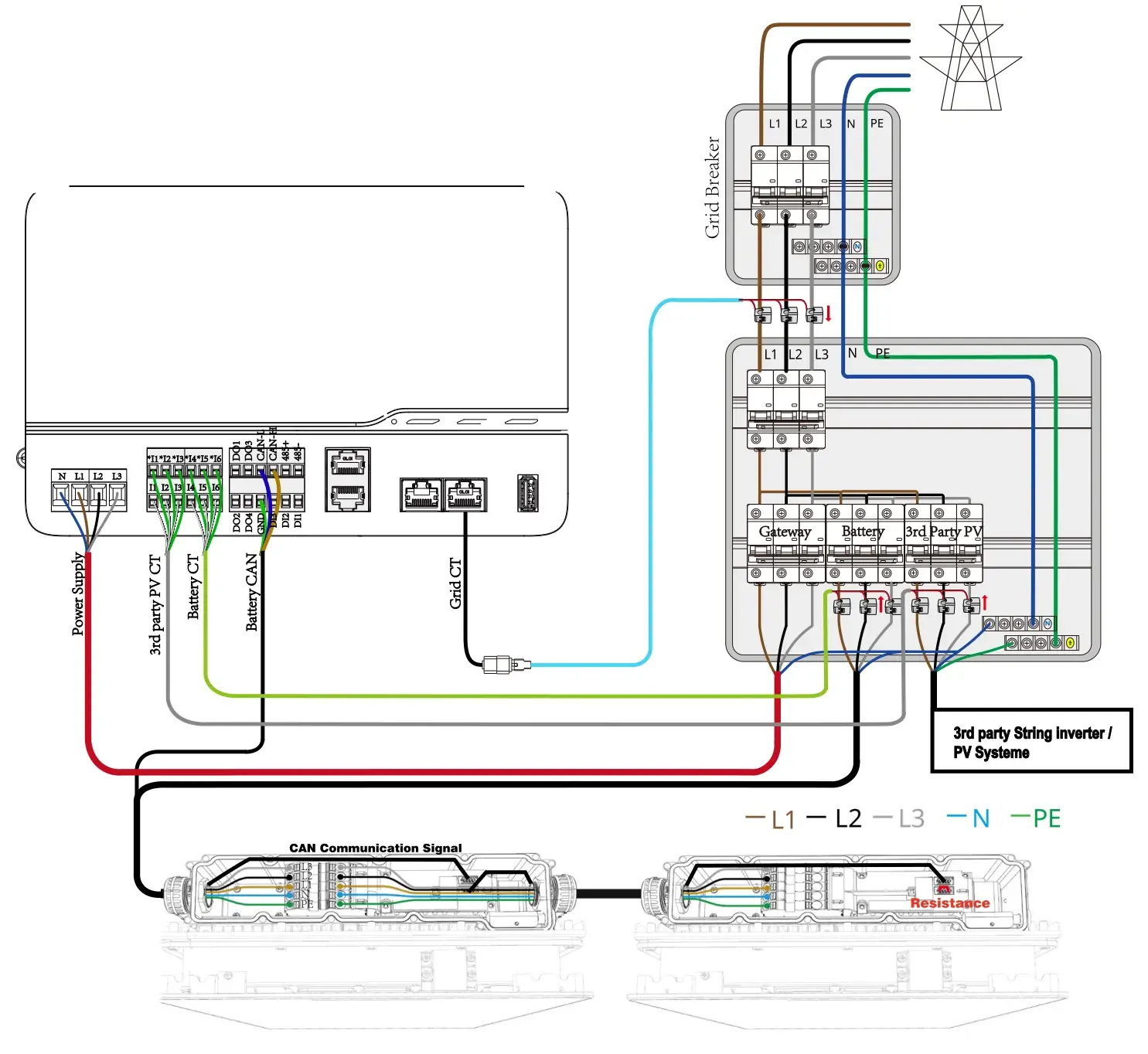
The above shows the wiring of relevant products to the M-Gateway in a 3 phase scenario..
Power Supply
-
Connect the power supply to N and L1, L2, and L3.
-
It is recommended to install a 10A circuit breaker to control the power on/off for the M-Gateway.
-
Ensure the phase sequence is consistent throughout the system.
Grid CT
-
Connect the Grid CT to the RJ45 terminal of the M-Gateway.
-
Install the CT on the main incoming grid cables.
-
The arrow on the CT must point from the grid to the distribution panel/M-Gateway.
-
All site loads must be located downstream of the Grid CT so that the M-Gateway can correctly measure the total site power flow.
-
Ensure each Grid CT is installed on the correct phase and that the phase mapping is consistent with L1 / L2 / L3.
PV CT
-
For L1, connect the cable with l1*/l4* to the l1* terminal and connect the cable with l1/l4 to the l1 terminal.
- For L2, connect the cable with l2*/l5* to the l2* terminal and connect the cable with l2/l5 to the l2 terminal.
- For L3, connect the cable with l3*/l6* to the l3* terminal and connect the cable with l3/l6 to the l3 terminal.
- Connect the CT to the CT cable adaptor.
-
Install the CT on the corresponding PV phase cables.
The arrow on the CT must point from the PV to the distribution panel/M-Gateway.
Battery CT
-
-
For L1, connect the cable with l1*/l4* to the l4* terminal and connect the cable with l1/l4 to the l4 terminal.
- For L2, connect the cable with l2*/l5* to the l5* terminal and connect the cable with l2/l5 to the l5 terminal.
- For L3, connect the cable with l3*/l6* to the l6* terminal and connect the cable with l3/l6 to the l6 terminal.
-
- Connect the CT to the CT cable adaptor.
-
Installthe CT on the corresponding battery AC phase cables.
The arrow on the CT must point from the battery to the distribution panel/M-Gateway.
Battery CAN Communication
- Connect the battery CAN cable to the communication terminal, paying close attention to the CAN-H, CAN-L and GND labelling.
Information in this article was current at the time of publication or last update. Product specifications, software, firmware and procedures may change. Please refer to the latest ATMOCE documentation before proceeding.